AI SaaS tools are helping startups across the USA save time, reduce operating costs, and compete with larger companies. Starting a business is exciting, but managing marketing, customer support, sales, and daily operations can quickly become expensive. Small teams often struggle to handle every task without hiring more employees.
Artificial intelligence and Software as a Service (SaaS) offer a practical solution. Startups can use online software to create content, automate repetitive work, analyze information, and communicate with customers. Many tools offer affordable monthly plans, making them accessible to businesses with limited budgets.
For example, a small e-commerce startup in Texas can use AI to write product descriptions, automate customer emails, and organize sales information. A software startup in California can use AI coding assistants to build and test products faster.
The best choice depends on your business goals, budget, and team size. This guide compares popular AI SaaS tools for startups in 2026, including their features, advantages, limitations, performance, and pricing.SEO Software Subscriptions
What Are AI SaaS Tools for Startups?
AI SaaS tools are cloud-based software applications that use artificial intelligence to help businesses complete tasks more efficiently. Users typically access these tools through a web browser or mobile application instead of installing and maintaining complex software.
SaaS stands for Software as a Service. Customers usually pay monthly or annually to access the software.
AI SaaS products can support different business activities, including:
- Content creation: Generate blog posts, emails, product descriptions, and marketing ideas.
- Project management: Organize tasks, deadlines, and team communication.
- Customer support: Answer common questions and manage customer requests.
- Marketing automation: Create campaigns and automate repetitive marketing tasks.
- Software development: Help developers write, review, and understand code.
- Business analytics: Summarize information and identify useful patterns.
A startup does not need to purchase every available tool. Choosing two or three solutions that solve its biggest problems can deliver better results than paying for many overlapping subscriptions.
Best AI SaaS Tools for Startups USA in 2026
These tools serve different purposes, so the best option depends on your startup’s needs.
1. ChatGPT — Best for General Business Tasks
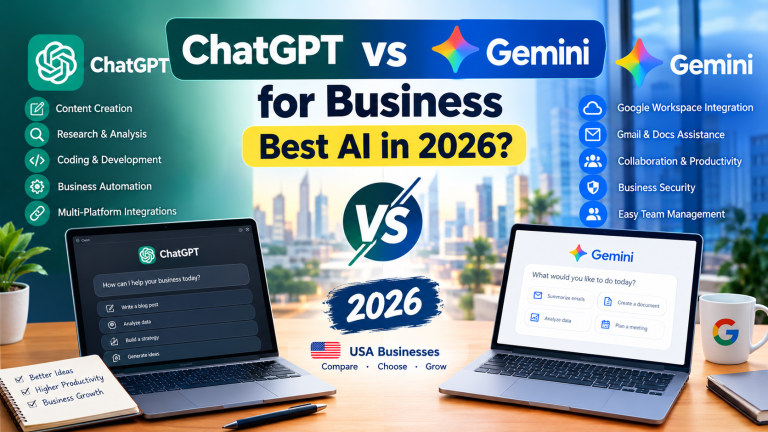
ChatGPT is a versatile AI assistant for startup founders, marketers, and small teams. It can help with research, brainstorming, content creation, customer communication, and data analysis.
Key features:
- Draft emails, blog posts, proposals, and business plans.
- Generate marketing ideas and social media content.
- Summarize documents and organize information.
- Assist with research, coding, and problem-solving.
Real-world example: A founder launching a fitness app can use ChatGPT to brainstorm brand names, prepare website copy, develop customer surveys, and draft an initial marketing plan.
Best for: Founders who need a flexible assistant for everyday business activities.
2. HubSpot — Best for CRM and Marketing
HubSpot offers customer relationship management (CRM), sales, marketing, and customer service software. Its AI features can help businesses create content, summarize customer interactions, and improve sales workflows. Best AI Software Subscriptions: Pricing Guide for 2026
Key features:
- Manage contacts and sales opportunities.
- Organize customer information.
- Support email marketing and campaign management.
- Automate selected sales and marketing tasks.
Real-world example: A startup selling accounting software to American businesses can use HubSpot to track leads, organize sales conversations, and follow up with potential customers.
Best for: Startups that need a central place to manage leads and customer relationships.
3. Zapier — Best for Workflow Automation
Zapier connects thousands of apps and helps businesses automate tasks without extensive coding. Its AI-related capabilities can support workflows involving forms, email, customer records, and other business applications.
Key features:
- Connect different business applications.
- Trigger actions automatically when events occur.
- Build workflows for lead management and notifications.
- Reduce repetitive administrative work.
Real-world example: When a customer completes a website contact form, a startup can automatically add the lead to its CRM, notify the sales team, and send a confirmation email.
Best for: Small teams that want to reduce manual work.
4. Notion AI — Best for Startup Knowledge Management
Notion combines documents, notes, databases, and project management features. Its AI capabilities can help teams summarize information, organize knowledge, and draft internal documents.
Key features:
- Maintain company documentation.
- Organize projects and meeting notes.
- Summarize long documents.
- Help teams find and use internal information.
Real-world example: A remote startup with employees in New York and Austin can keep product plans, onboarding guides, meeting notes, and task lists in one shared workspace.
Best for: Startups that need organized documentation and collaboration.
5. Canva — Best for Marketing and Design
Canva helps startups create marketing graphics, presentations, social media posts, and other visual materials. Its AI-powered features can assist with design and content production.
Key features:
- Create social media graphics and advertisements.
- Design presentations and branded materials.
- Use AI-assisted image and content tools.
- Produce visual content without advanced design skills.
Real-world example: A new online clothing store can create promotional banners, Instagram posts, product announcements, and advertising designs without hiring a full-time designer.
Best for: Startups that need affordable visual marketing.
6. GitHub Copilot — Best for Software Startups
GitHub Copilot assists software developers with code suggestions, explanations, and development workflows. It can help teams write code and understand unfamiliar programming patterns.
Key features:
- Suggest code while developers work.
- Explain existing code.
- Help generate tests and documentation.
- Support selected coding workflows.
Real-world example: A small software company building a scheduling application can use an AI coding assistant to draft repetitive functions and tests. Developers must still review the output for errors and security issues.
Best for: Startups developing software products or maintaining codebases.
AI SaaS Features Comparison Table
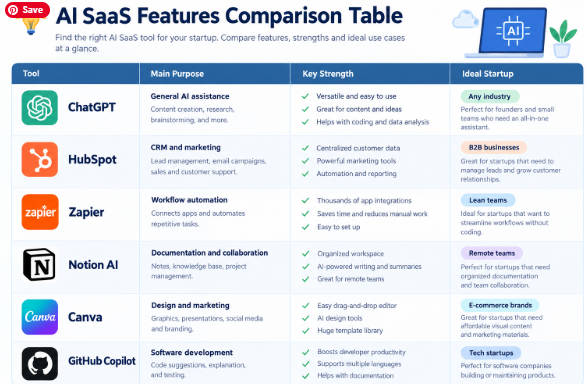
| Tool | Main Purpose | Key Strength | Ideal Startup |
|---|---|---|---|
| ChatGPT | General AI assistance | Flexible business support | Any industry |
| HubSpot | CRM and marketing | Lead management | B2B businesses |
| Zapier | Automation | App integrations | Lean teams |
| Notion AI | Documentation | Knowledge organization | Remote teams |
| Canva | Design | Visual content creation | E-commerce brands |
| GitHub Copilot | Coding | Developer assistance | Tech startups |
The comparison shows that these tools solve different problems. ChatGPT offers broad assistance, HubSpot focuses on customer relationships, Zapier connects workflows, and GitHub Copilot supports software development.
Pros and Cons of AI SaaS Tools for Startups
AI software can help startups operate efficiently, but it is not a replacement for business planning or human judgment.
Advantages of AI SaaS Software
- Lower initial costs: Cloud-based tools usually avoid large upfront software investments.
- Faster workflows: AI can help draft content, summarize information, and automate routine tasks.
- Easy access: Teams can often work from different locations using internet-connected devices.
- Flexible growth: Startups can add users or features as their requirements change.
- Better productivity: Employees can spend more time on customers, product development, and business strategy.
- Less technical setup: Many SaaS products offer interfaces that nontechnical founders can use.
Disadvantages of AI SaaS Software
- Subscription expenses: Multiple monthly plans can become costly as a business grows.
- Incorrect results: AI-generated information may contain mistakes or outdated claims.
- Privacy concerns: Sensitive customer information requires careful handling.
- Vendor dependence: Changes in pricing, features, or service availability can affect operations.
- Learning requirements: Employees may need training to use tools effectively.
- Integration limitations: Some applications require higher-tier plans or additional configuration to work together.
Startups should review security policies, user permissions, data retention practices, and subscription terms before adopting an AI tool.
AI SaaS Performance Comparison for Startups
The following table provides a qualitative comparison based on each product’s main purpose. It is not a laboratory benchmark, and actual results depend on the workflow, subscription plan, and user experience.
| Tool | Task Efficiency | Ease of Use | Automation Potential | Overall Fit |
|---|---|---|---|---|
| ChatGPT | High for supported tasks | Easy to moderate | Medium to high | Very versatile |
| HubSpot | High for organized sales workflows | Moderate | High | Strong for CRM |
| Zapier | High for repetitive workflows | Moderate | Very high | Strong for automation |
| Notion AI | High for documentation tasks | Easy to moderate | Medium | Strong for teamwork |
| Canva | High for routine design tasks | Easy | Medium | Strong for marketing |
| GitHub Copilot | High for supported coding tasks | Moderate | High | Strong for developers |
Which tool performs best?
There is no single winner for every startup. Zapier is a strong choice for connecting applications, while HubSpot is more suitable for managing leads and customer relationships. Canva supports visual marketing, and GitHub Copilot focuses on software development.
A founder should measure performance using practical indicators such as hours saved, customer response time, qualified leads, error rates, and total monthly costs.
AI SaaS Pricing Comparison in 2026
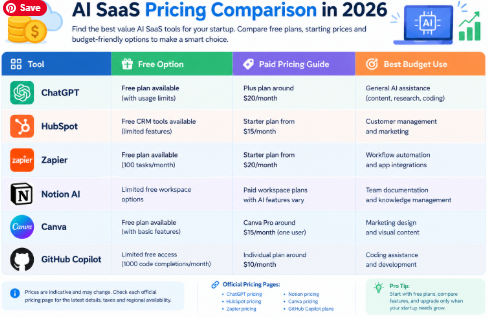
Pricing is an important consideration for startups operating with limited cash. The table below provides indicative starting prices in US dollars for commonly available plans. These are planning estimates, not verified live quotations; prices and feature limits may change.
| Tool | Free Option | Paid Pricing Guide | Best Budget Use |
|---|---|---|---|
| ChatGPT | Free plan available | Entry-level paid plan around $20/month | General AI assistance |
| HubSpot | Free CRM tools available | Starter products may begin around $15/month | Customer management |
| Zapier | Free plan available | Paid entry plan around $20/month | Workflow automation |
| Notion AI | Limited free workspace options | Paid workspace plans and AI features vary | Team documentation |
| Canva | Free plan available | Canva Pro around $15/month for one user | Marketing design |
| GitHub Copilot | Limited free access available | Individual paid plan around $10/month | Coding assistance |
Check each official pricing page before purchasing. Billing frequency, taxes, promotional offers, usage limits, AI credits, and regional availability can affect the final price.
Official pricing pages:
How Startups Can Control AI Software Costs
A startup should calculate the total cost before subscribing. A $15 monthly tool may look inexpensive, but six subscriptions can create a $90 monthly expense before taxes or add-ons.
Follow these practical steps:
- Start with free plans when they meet your needs.
- Upgrade only when you reach a meaningful usage limit.
- Compare annual billing with monthly billing before committing.
- Remove duplicate tools that perform the same tasks.
- Track actual usage and business results every month.
How to Choose the Best AI SaaS Tools for Your Startup
The right software depends on your current business stage and the problem you want to solve.
Choose Tools Based on Your Business Goal
For a new startup: Start with ChatGPT for general tasks and Notion for documentation. Add other products when a specific need appears.
For an e-commerce business: Canva can support product promotions, while Zapier can connect order forms, email tools, and customer databases.
B2B startup: HubSpot can help manage leads, organize sales activities, and monitor customer interactions.
For a software company: GitHub Copilot can assist developers, while a project management workspace can help organize product development.
Check Security and Scalability
Before selecting a subscription, ask these questions:
- Does the service offer the integrations your team needs?
- Can you control who accesses business information?
- Are the privacy terms suitable for your customer data?
- Will the software remain useful as your team grows?
- Can you export important information if you change providers?
Read the US Small Business Administration’s business planning resources for broader guidance on building and managing a business.
For more software comparisons, explore ToolPromptHub, where you can find additional guides to AI tools, productivity software, and business solutions.
FAQs About AI SaaS Tools for Startups USA
1. What are the best AI SaaS tools for startups in the USA?
ChatGPT, HubSpot, Zapier, Notion AI, Canva, and GitHub Copilot are useful options for different startup needs. The best choice depends on whether you need content creation, customer management, automation, design, or coding assistance.
2. Are AI SaaS tools affordable for small startups?
Yes. Many providers offer free plans or relatively inexpensive entry-level subscriptions. Startups can begin with essential features and upgrade as revenue and workload increase. Always check usage limits and additional fees.
3. Can AI SaaS tools replace startup employees?
AI can automate selected repetitive tasks and assist employees with writing, research, customer communication, and coding. It cannot reliably replace every human responsibility. Strategy, accountability, customer relationships, and complex decisions still require human judgment.
4. Which AI SaaS tool is best for startup automation?
Zapier is a strong option for connecting applications and automating repetitive workflows. HubSpot also offers automation features for sales and marketing. The right solution depends on the applications your startup already uses.
5. How should a startup measure the ROI of AI software?
Compare the money and time saved with the total subscription and implementation costs. Track measurable results, such as reduced administrative hours, faster customer responses, fewer errors, and additional sales. Review the results monthly to decide whether each subscription is worthwhile.
Conclusion:
AI SaaS tools can help USA startups save time, improve productivity, and manage limited resources. ChatGPT is a strong general-purpose choice, HubSpot helps organize customer relationships, Zapier automates repetitive workflows, and Canva supports affordable marketing design. Software startups can benefit from GitHub Copilot.
The best overall strategy is to start small. Select tools that solve immediate problems, measure their results, and expand your software stack when your business needs grow. A carefully chosen set of AI tools can help a startup work smarter without creating unnecessary expenses.