AI image generator comparison helps US creators, bloggers, marketers, and small business owners choose the right tool for creating professional visuals. Hiring designers for every project can be expensive, while traditional design software may take time to learn. AI image generators turn written prompts into illustrations, product concepts, social media graphics, and marketing images.
Several tools offer different benefits. ChatGPT Images supports conversational image creation and editing. Midjourney focuses on creative visual exploration. Adobe Firefly fits into Adobe’s creative workflow, while Ideogram is worth considering for designs that require readable text.
The right choice depends on your budget, image style, editing needs, and commercial requirements. This guide compares popular AI image generators available to US users in 2026, including their features, advantages, limitations, performance, and pricing considerations. Best AI Image Generators in the USA
What Is an AI Image Generator?
An AI image generator is a tool that creates images from text prompts, reference images, or other supported inputs. You describe the scene, subject, style, lighting, colors, and composition. The AI model uses that information to generate a visual result.
For example, a small business owner could enter this prompt:
“Create a realistic product photograph of a reusable water bottle on a clean white background, with soft studio lighting and space for advertising text.”Best AI Tools for Small Business USA in 2026
The generator creates an image based on the instructions. The user can then refine the prompt, generate alternatives, or use editing features where available. Best image generator AI
Common uses of AI image generators
- Blogging: Create featured images and illustrations for articles.
- E-commerce: Develop product concepts and promotional visuals.
- Social media: Design campaign images for Instagram, Facebook, and Pinterest.
- Advertising: Explore creative concepts before producing a final campaign.
- Education: Create diagrams, visual examples, and learning materials.
- Branding: Explore concepts for packaging, backgrounds, and visual identity.
AI-generated images still need human review. Small details, product features, hands, logos, and text may be inaccurate. Always inspect the output before publishing it.
Best AI Image Generators in the USA: Features Comparison
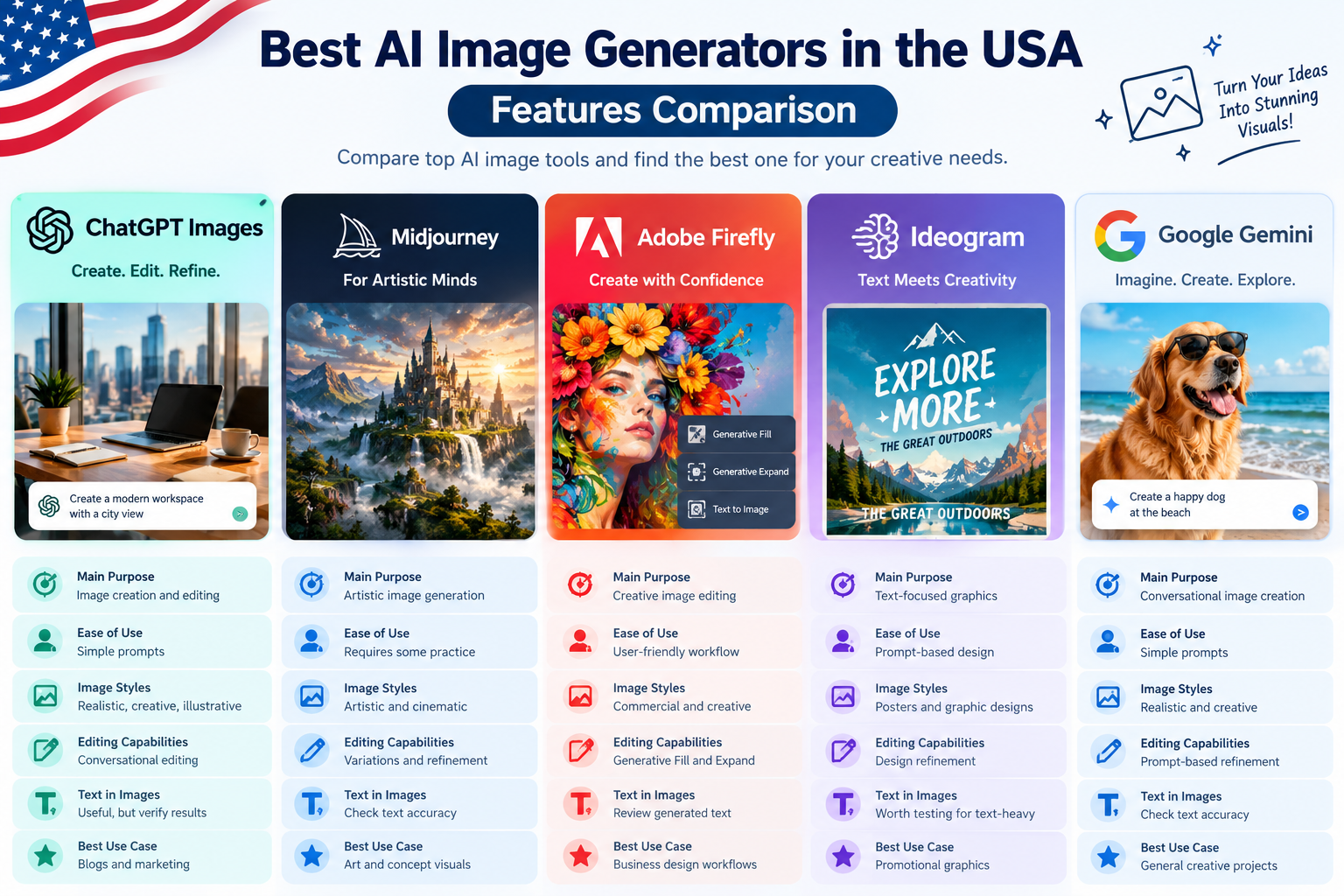
The following tools serve different creative needs. No single generator is ideal for every project.
AI image generator comparison table
| Tool | Main strength | Best for | Free access |
|---|---|---|---|
| ChatGPT Images | Prompt-based creation and editing | Bloggers and general users | Limited access |
| Midjourney | Artistic visual exploration | Artists and creative teams | Check current access |
| Adobe Firefly | Adobe creative workflows | Designers and marketers | Limited free access |
| Ideogram | Text-focused graphic concepts | Posters and advertisements | Limited free access |
| Google Gemini image generation | Conversational image creation | Google ecosystem users | Availability and limits vary |
Features and availability can change as providers update their models and plans. Check each provider’s current documentation before purchasing.
1. ChatGPT Images
ChatGPT Images is useful for people who want to create and refine images through natural-language instructions. Users can describe an idea, request changes, and continue improving a visual through conversation.
Key features:
- Text-to-image generation.
- Conversational editing and refinement.
- Support for different visual concepts and styles.
- Integration with the ChatGPT workflow.
Real-world example: A blogger writing about productivity software can request a modern workspace illustration, then ask for different colors or a wider composition for a website banner.
Limitations: Access and usage limits depend on the plan. Generated text and fine visual details should be checked carefully.
Official information: ChatGPT Images.
2. Midjourney
Midjourney is designed for users who want to explore artistic styles, dramatic lighting, detailed environments, and polished visual concepts. It can be useful when the image itself is a central part of the creative project. Stock Media Alternatives USA
Key features:
- Artistic image generation.
- Exploration of different visual styles.
- Options for generating variations and refining compositions.
- Paid subscription tiers with different generation allowances.
Real-world example: An independent game developer can explore fantasy landscapes, futuristic cities, character concepts, and cinematic environments before choosing a direction for a project.
Limitations: Beginners may need practice to achieve consistent results. Subscription costs, generation limits, and privacy features depend on the selected plan.
Official information: Midjourney plans.
3. Adobe Firefly
Adobe Firefly is suited to creators who want AI-assisted image creation and editing within an Adobe-focused workflow. Its tools can help users develop campaign visuals, modify images, expand backgrounds, and explore creative variations.
Key features:
- AI image generation and editing.
- Generative Fill and Generative Expand features.
- Integration with supported Adobe creative products.
- Plans with different generative-credit allowances.
Real-world example: A marketing team can adapt a product photograph for a seasonal campaign by changing its background and creating additional space for promotional copy.
Limitations: Premium features may consume generative credits. Commercial-use terms and protections depend on the model, feature, and applicable Adobe terms.
Official information: Adobe Firefly plans.
4. Ideogram
Ideogram is worth evaluating for designs that include words, headings, labels, or poster-style compositions. Text rendering remains an important consideration when comparing image generators.
Key features:
- Image generation from text prompts.
- Design-oriented visual creation.
- Tools for exploring typography-led concepts.
- Free and paid access options, subject to current plan limits.
Real-world example: A US fitness coach could create a draft promotional poster featuring a workout theme and a short headline. The coach should verify every word before using the image in an advertisement.
Limitations: Text can still contain mistakes, and complex layouts may require additional editing. Review current plan limits and licensing terms before using outputs commercially.
Official website: Ideogram.
5. Google Gemini Image Generation
Google Gemini’s image-generation capabilities allow users to create or refine visual ideas through supported Gemini experiences and models. Availability and capabilities can differ by product, account, and region.
Key features:
- Conversational image creation.
- Image refinement through follow-up instructions.
- Integration with supported Google AI experiences.
- API options for developers using eligible image models.
Real-world example: A small online retailer could explore several lifestyle scenes for a product campaign, then select concepts for further editing.
Limitations: Access, usage limits, model availability, and pricing vary. Developers using the API may pay according to usage rather than a standard consumer subscription.
Pros and Cons of AI Image Generators
AI image generators can reduce the time required to develop visual concepts, but they do not remove the need for creative judgment and quality control. Stock Media Alternatives USA
Advantages
- Faster concept creation: Generate several ideas without arranging a traditional photo shoot.
- Flexible styles: Explore realistic photography, illustrations, and imaginative scenes.
- Lower initial costs: Free tiers can help users test tools before subscribing.
- Useful for content marketing: Bloggers can create visuals tailored to individual articles.
- Easy experimentation: Change prompts to explore different compositions and colors.
Disadvantages
- Inconsistent accuracy: Images may contain distorted objects or incorrect details.
- Learning curve: Better prompts and repeatable workflows take practice.
- Usage limits: Free plans and paid subscriptions may restrict generation.
- Commercial considerations: Copyright, licensing, privacy, and usage rules vary.
- Editing requirements: Important text, logos, and product details may need manual correction.
Businesses should read the provider’s terms and check applicable laws before using generated images in commercial campaigns.
AI Image Generator Performance Comparison
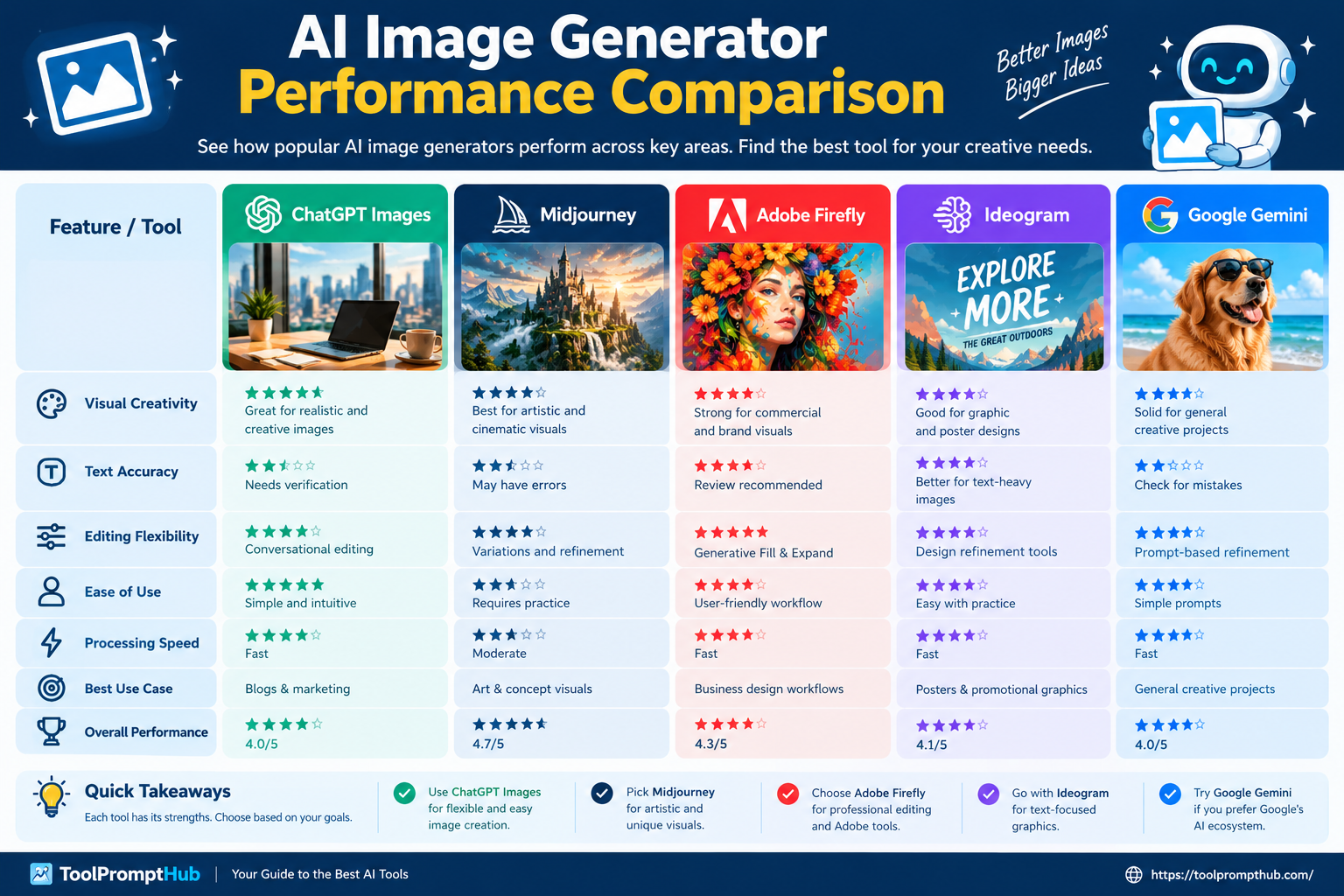
Performance depends on the type of image you need. A visually attractive illustration is not necessarily the best choice for a poster containing exact wording or a product photograph that must match a real item.
The table below provides a practical, use-case-based assessment rather than claiming results from controlled benchmark testing.
| Tool | Visual creativity | Text-based editing | Design workflow | Suitable use |
|---|---|---|---|---|
| ChatGPT Images | Broad creative tasks | Conversational refinements | General-purpose | Blog and marketing visuals |
| Midjourney | Artistic exploration | Workflow-dependent | Creative exploration | Concept art and illustrations |
| Adobe Firefly | Creative production | Editing-focused tools | Adobe ecosystem | Campaign and photo editing |
| Ideogram | Graphic concepts | Text-focused generation | Poster-oriented designs | Headlines and promotional graphics |
| Google Gemini | General visual concepts | Conversational refinements | Google AI ecosystem | Ideas and image variations |
Actual results depend on the model version, prompt quality, settings, and editing process. Test the same prompt in your shortlisted tools before committing to a paid subscription.
How to test image quality
Use a consistent prompt and compare the results against these criteria:
- Prompt accuracy: Does the image match the requested subject and scene?
- Visual quality: Are lighting, composition, and details convincing?
- Text accuracy: Are headings and labels readable and spelled correctly?
- Editing control: Can you change one element without disrupting the rest?
- Practical usability: Does the image fit the intended website, ad, or social platform?
For example, an online store should prioritize product accuracy and clean backgrounds. An artist may prioritize atmosphere, style, and creative freedom.
AI Image Generator Pricing Comparison in 2026
Pricing is an important factor for US users. A free plan may be sufficient for occasional images, while professional creators may need higher limits, advanced editing, or commercial workflow features.
| Tool | Pricing approach | What to check |
|---|---|---|
| ChatGPT Images | Included image access varies by ChatGPT plan | Generation limits and plan features |
| Midjourney | Basic starts at $10/month; higher tiers cost more | Fast GPU time, Relax Mode, privacy |
| Adobe Firefly | Free access and paid plans | Generative credits and included features |
| Ideogram | Free and paid plans | Priority generations, privacy, and limits |
| Google Gemini | Consumer plans and developer API options | Regional availability and usage charges |
Midjourney’s published monthly subscription prices include Basic at $10, Standard at $30, Pro at $60, and Mega at $120. Annual billing can reduce the effective monthly price.
Adobe Firefly plan prices and included benefits can vary by country, billing arrangement, and product bundle. Check the official Firefly pricing page for current US pricing.
ChatGPT image-generation access varies by subscription and usage limits. Check is before choosing a plan. Google API pricing is usage-based for supported models;
Budget tip: Calculate the cost of usable final images, not just the subscription fee. If a tool generates many images that need correction, a cheaper plan may not offer the best value.
Frequently Asked Questions
1. What is the best AI image generator in the USA in 2026?
The best option depends on your project. ChatGPT Images is useful for conversational creation, Midjourney for artistic exploration, Adobe Firefly for Adobe-centered workflows, Ideogram for text-focused graphics, and Gemini for users who prefer Google’s AI ecosystem.
2. Which AI image generator is free?
Several providers offer limited free access or trial allowances. ChatGPT, Adobe Firefly, Ideogram, and Google Gemini may offer free access to supported image features, subject to account eligibility and changing usage limits. Check current terms before relying on a free plan.
3. Which AI image generator is best for business marketing?
Adobe Firefly is worth considering for Adobe-based creative workflows. ChatGPT Images can help develop campaign concepts, while Ideogram can help explore text-focused designs. Businesses should check licensing terms, review output quality, and verify advertising claims before publication.
4. Can I use AI-generated images commercially?
Commercial use depends on the provider’s terms, the model used, the content created, and applicable laws. Check licensing and restrictions before using images in advertisements, products, or client work. Avoid unauthorized logos, copyrighted characters, and misleading depictions.
5. Are AI image generators suitable for blog featured images?
Yes. They can create custom visuals for blog posts, tutorials, comparisons, and product-related articles. Use an appropriate aspect ratio, inspect the final image, and add descriptive alt text that accurately explains the image. Do not stuff the alt attribute with keywords.
Conclusion: Which AI Image Generator Wins?
There is no universal winner in this AI image generator comparison for the USA. The most suitable tool depends on the work you need to complete.
- Choose ChatGPT Images for conversational image creation and iterative edits.
- Choose Midjourney for artistic exploration and visually distinctive concepts.
- Choose Adobe Firefly for AI-assisted editing in Adobe-centered creative workflows.
- Choose Ideogram when readable text is important to a graphic.
- Explore Google Gemini if conversational image creation fits your existing Google workflow.
For a blogger or small business owner, start with a free option where available and test it using a real project. Compare image accuracy, editing effort, usage limits, and licensing before paying.
The smartest choice is the tool that consistently produces usable images for your specific needs, fits your budget, and supports your publishing or marketing workflow.