Canva vs Adobe Express for Business is a practical choice for U.S. companies that need fast, professional content without putting every social post, presentation, flyer, or ad through a designer. Both platforms offer templates, AI tools, brand controls, collaboration, and content creation features. The better option depends on team size, Adobe workflow needs, brand management, content volume, and budget. ChatGPT vs Gemini for Business: Which AI Is Better in 2026?
A local restaurant can use either platform to create weekly Instagram posts and menu graphics. A SaaS company can use them for pitch decks, ads, webinars, sales PDFs, and product announcements. A growing marketing team may care more about approvals, brand consistency, and integrations than individual design features.
What Is Canva vs Adobe Express for Business?
Canva Business is an all-in-one visual communication platform built around easy design, collaboration, brand management, templates, AI, and content workflows. Canva Business currently lists 3.6M+ templates, 141M+ premium photos, videos, graphics, and audio, 100 Brand Kits and approvals, 500GB storage, and expanded AI access.
Adobe Express is Adobe’s quick content creation platform for businesses. It supports social posts, videos, presentations, flyers, PDFs, brand kits, templates, content scheduling, collaboration, and AI features powered by Adobe Firefly. Adobe Express can connect with Photoshop, Illustrator, InDesign, Lightroom, Acrobat, Experience Manager, Workfront, and other Adobe workflows.
For a U.S. business, the simplest distinction is this: Canva is stronger as a broad team design workspace, while Adobe Express is especially attractive when a company already relies on Adobe Creative Cloud and Adobe’s business ecosystem.
Canva vs Adobe Express Features Comparison
| Feature | Canva Business | Adobe Express |
|---|---|---|
| Templates | 3.6M+ templates | Premium static and video templates |
| Stock assets | 141M+ premium assets | 200M+ Adobe Stock assets on Teams |
| Brand tools | Brand Kits, templates, controls, approvals | Brand kits, locked templates, brand controls |
| AI | Canva AI, AI connectors, AI design tools | Adobe Firefly, AI Assistant beta |
| Collaboration | Real-time co-design, comments, tasks | Live co-editing, comments, reviews |
| Social content | Strong design and scheduling tools | Content Scheduler and social workflows |
| Video | Templates and editing tools | Video creation and editing |
| PDF workflow | Import PDFs into editable Canva designs | PDF editing powered by Acrobat |
| Adobe ecosystem | Limited compared with Adobe | Strong Creative Cloud integration |
| Enterprise controls | Enterprise security, SSO, permissions | Enterprise security, SSO, admin tools |
Canva Business focuses on making visual production simple for marketers, sales teams, founders, HR departments, and non-designers. Brand Kits can store logos, colors, fonts, imagery, and guidelines. Canva says its current business Brand Kit system can manage up to 100 separate brands. Brand templates can lock important elements, and teams can assign approvers before content is published ChatGPT vs Gemini for Business in 2026
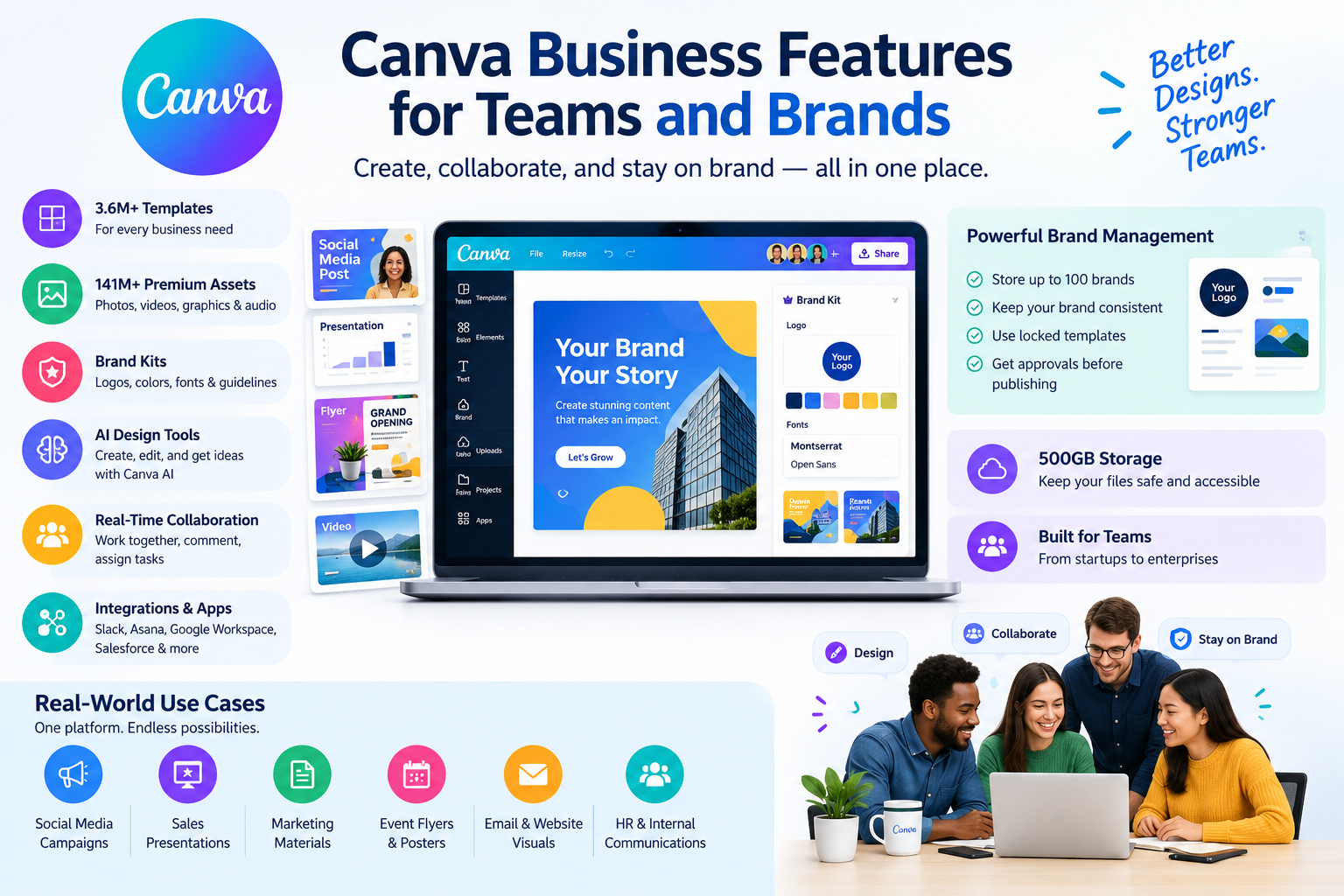
Real-time collaboration is another major advantage. Team members can work inside the same design, comment, tag colleagues, and assign actions. Canva also connects with tools such as Slack, Asana, Microsoft Teams, Salesforce, and Google Workspace.
Real-world example: A U.S. real estate company with five agents can create a locked property-listing template. Each agent changes the property photo, price, address, and details while the company logo, fonts, and colors remain controlled.
Canva is also useful for marketing teams that need many content formats. One team can create Instagram posts, LinkedIn graphics, email visuals, presentations, lead magnets, flyers, and sales materials inside one workspace.
Adobe Express Business Features for Marketing Teams
Adobe Express focuses on quick creation with strong Adobe integration. Teams can create social posts, videos, presentations, flyers, documents, and other business content. Brand kits keep approved logos, fonts, colors, and assets available to the team. Locked templates help prevent users from changing important brand elements.
Adobe Express also offers quick actions such as background removal, resizing, video captioning, QR code creation, and content translation. Adobe says its Teams plan includes 200M+ royalty-free Adobe Stock photos, videos, music tracks, and design elements.
Real-world example: A U.S. ecommerce brand can design one product campaign in Adobe Express, resize the creative for multiple social channels, remove an image background, add captions to a short video, and schedule posts. A creative team can bring assets from Photoshop or Illustrator into the workflow.
Adobe Express is especially compelling for businesses already using Adobe Creative Cloud. Designers can prepare assets in Photoshop or Illustrator while marketing staff use Express for faster edits and campaign variations.
Canva vs Adobe Express Pros and Cons
Business Pros
- Very easy for beginners and non-designers
- Strong template library
- Excellent team collaboration
- Powerful brand management
- Large content and asset library
- Useful AI design features
- Strong support for marketing, sales, HR, and internal content
- Broad integrations and apps
Canva Business Cons
- Advanced professional editing is not as deep as full Adobe desktop apps
- Large organizations may need Enterprise for advanced governance
- The number of features can feel overwhelming to new users
Adobe Express Pros
- Strong connection with Adobe Creative Cloud
- Large Adobe Stock library
- Firefly-powered generative AI
- Strong PDF and document workflows
- Excellent quick editing tools
- Brand kits and locked templates
- Good option for teams already using Adobe products
Adobe Express Cons
- Some advanced business features depend on higher plans or enterprise services
- The Adobe ecosystem can feel more complex for small teams
- Users who only need simple social graphics may not need the broader Adobe ecosystem
Canva vs Adobe Express Performance Comparison
| Performance area | Canva | Adobe Express |
|---|---|---|
| Ease of use | Excellent | Excellent |
| Beginner learning curve | Very low | Low |
| Team collaboration | Excellent | Excellent |
| Brand consistency | Excellent | Excellent |
| Social content production | Excellent | Excellent |
| Presentation creation | Excellent | Very good |
| PDF workflows | Very good | Excellent |
| Adobe workflow | Good | Excellent |
| AI content creation | Excellent | Excellent |
| Large content operations | Excellent | Excellent |
| Best for non-designers | Excellent | Very good |
Canva feels especially efficient when a business creates many different visual formats with the same team. Its templates and brand system reduce repetitive work.
Adobe Express performs strongly when content creation connects to existing Adobe files and services. A company with Photoshop, Illustrator, Acrobat, Experience Manager, or Workfront already in its workflow can get more value from Express.
Canva vs Adobe Express Pricing
| Plan | Canva | Adobe Express |
|---|---|---|
| Free | Free plan available | Free plan available |
| Business/team plan | Canva Business: US$250/year per person | Adobe Express Teams: US$4.99/month per person for first year |
| Regular Adobe Teams price | — | US$7.99/month per person after introductory pricing |
| Minimum seats | Varies by plan | 2 seats |
| Enterprise | Contact sales | Contact sales |
Pricing can change, so U.S. businesses should check the official pricing pages before purchasing. Canva currently lists Business at US$250 per person per year. Adobe lists Express Teams at US$4.99 per person per month for the first year, renewing at US$7.99 per person per month, with a two-seat minimum.
The price comparison is not the whole story. A team already paying for Adobe products may prefer Express because it fits the existing creative stack. A company starting from scratch may prefer Canva because of its broad all-in-one design workflow.
Best Business Use Cases for Canva and Adobe Express
Canva is a strong fit for businesses where many employees need to create content without formal design training. Common use cases include What Is ChatGPT vs Gemini for Business?
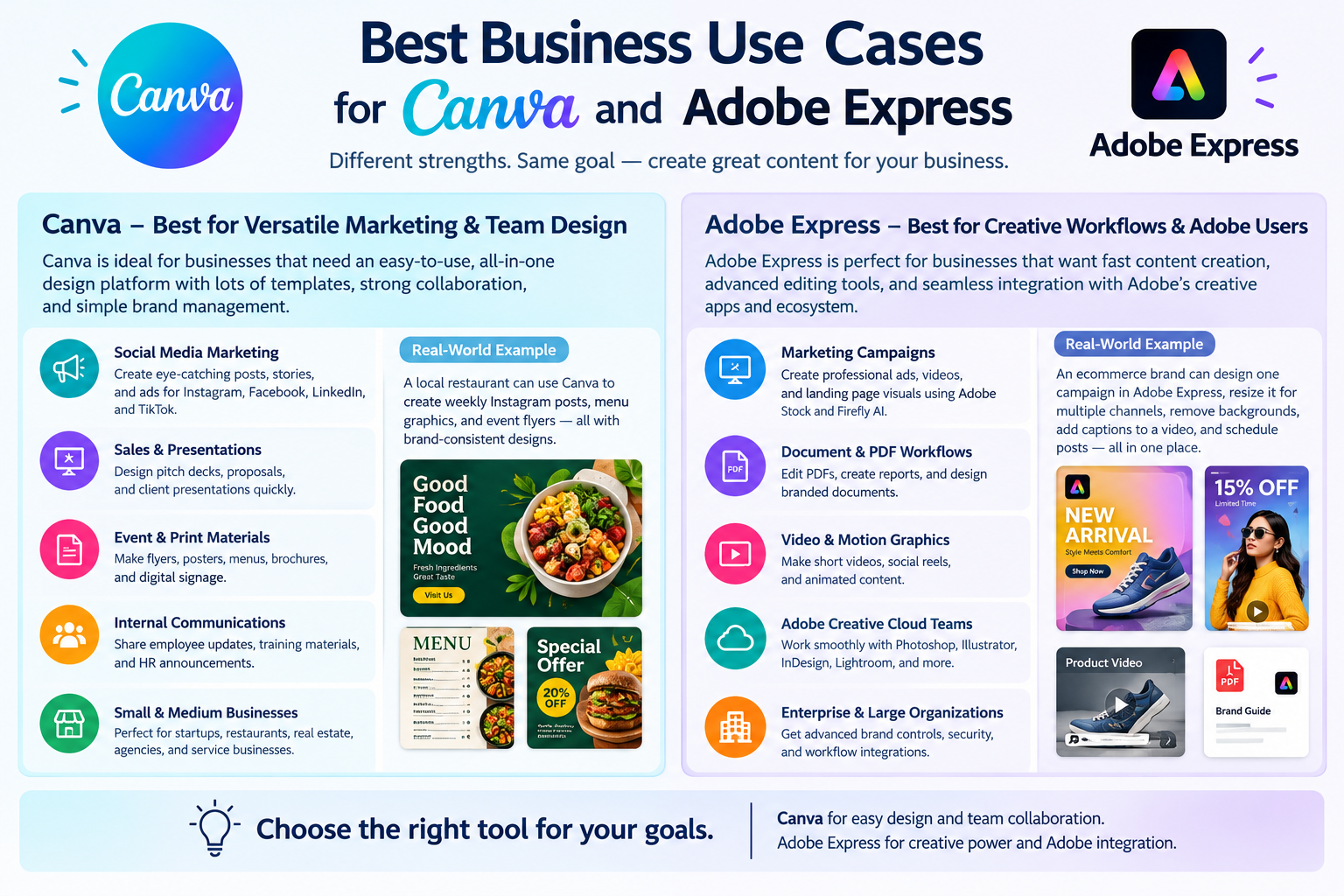
- Social media campaigns for Instagram, Facebook, LinkedIn, and TikTok
- Sales presentations and pitch decks
- Event flyers, posters, menus, and digital signs
- Recruitment graphics and employee communications
- Branded email and website visuals
- Agency client content and reusable templates
Adobe Express fits teams that need fast content creation alongside professional Adobe tools. Common use cases include:
- Marketing campaigns built from Photoshop or Illustrator assets
- Product ads using Adobe Stock images and video
- PDF editing and document-based marketing
- Short-form video and social campaigns
- Brand-controlled content for distributed teams
- Enterprise workflows connected to Adobe Experience Manager or Workfront
A 20-person U.S. startup may find Canva easier when marketers, founders, sales staff, and customer success teams all create their own visuals. A national retail company with an established creative department may prefer Adobe Express because designers can hand off Adobe files while other employees make approved variations.
Which Business Should Choose Canva or Adobe Express?
Choose Canva when ease of use, template variety, fast collaboration, and broad marketing content matter most. Canva is a natural fit for teams that want employees to create polished content without learning complex creative software.
Choose Adobe Express when Adobe integration, PDF workflows, Adobe Stock, Firefly, and enterprise creative operations matter more. Express can reduce friction between professional designers and non-designers working on the same campaign.
For a business starting a new design workflow, test the same real project in both platforms. Create a social campaign, sales presentation, one-page flyer, and short video. Compare production time, approval steps, brand consistency, editing flexibility, and total cost per user. The platform that reduces the most repetitive work is usually the better business investment.
FAQs: Canva vs Adobe Express for Business
1. Is Canva or Adobe Express better for small businesses?
Canva is usually the easier starting point for small businesses that need social posts, presentations, flyers, ads, and branded content. Its interface is beginner-friendly and its templates can reduce design time.
Adobe Express is a strong choice for a small business already using Adobe products or needing Adobe Stock, Firefly, Acrobat-related workflows, or quick video and PDF tools.
2. Which is better for team collaboration, Canva or Adobe Express?
Both support collaboration, comments, approvals, and brand controls. Canva has a particularly strong reputation for simple team-based design and visual collaboration. Adobe Express is attractive for teams connected to Adobe Creative Cloud and enterprise Adobe services
3. Is Canva better than Adobe Express for social media?
Canva is an excellent choice for businesses producing large volumes of social graphics. Its templates, brand tools, resizing features, and content workflows make repeated campaign production simple.
Adobe Express is also strong for social media. Its Content Scheduler, quick actions, templates, video tools, and Adobe ecosystem can make it a better fit for Adobe-centered teams.
4. Which has better AI tools for business?
Both have strong AI features. Canva offers Canva AI and brand-aware creation features. Adobe Express uses Adobe Firefly for generative AI and promotes commercially safe AI for business workflows.
The better option depends on the task. Canva is strong for quick branded design generation. Adobe is strong for AI features connected to its creative ecosystem and Firefly technology.
5. Should a business use Canva or Adobe Express in 2026?
Choose Canva if your priority is easy team design, marketing content, templates, collaboration, and brand management in one platform.
Choose Adobe Express if your team already uses Adobe Creative Cloud, Adobe Stock, Acrobat, Experience Manager, Workfront, or other Adobe services.
Conclusion: Canva vs Adobe Express for Business Winner
Canva wins for most small and midsize U.S. businesses that want a simple, flexible, all-in-one design platform. It is especially strong for marketing teams, sales teams, startups, agencies, real estate companies, restaurants, and service businesses that need a high volume of branded content.
Adobe Express wins for businesses already invested in Adobe. Its Creative Cloud connections, Adobe Stock library, Firefly AI, PDF capabilities, and enterprise integrations make it a powerful choice for larger or Adobe-centered teams.
The final choice comes down to workflow. Pick Canva for simplicity and broad business design. Pick Adobe Express for Adobe integration and creative production. Both are capable business design platforms in 2026.