
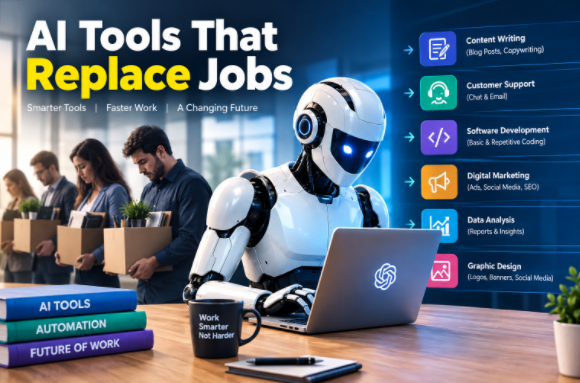
AI job replacement is becoming a major workplace topic in the United States. AI can now write emails, create images, analyze documents, generate software code, answer customer questions, organize data, and automate business workflows. A 2026 Reuters report said 44% of U.S. workplaces were using AI by May 2026, while productivity gains were still developing.
The important question is not only whether AI will replace jobs. The bigger question is which tasks can be automated and which human skills remain valuable.
A small business owner in Texas can use AI to create marketing content. A customer service team in California can use AI to answer routine questions. A software company in New York can use AI coding tools to assist developers. A marketing agency in Florida can automate reports and repetitive campaign tasks Most Powerful AI Tools Today.
AI is changing job responsibilities across many industries. Workers who understand these tools can use them as productivity assistants rather than treating them only as job-replacement technology.
What Is AI Job Replacement?
AI job replacement means using artificial intelligence to perform tasks that were previously completed by human workers.
A complete job is rarely one single task. Most jobs contain many activities. AI may automate some activities while people continue handling decisions, communication, creativity, relationships, and responsibility.
Common tasks that AI can perform include:
- Writing basic articles and product descriptions
- Summarizing long documents
- Answering common customer questions
- Creating simple marketing graphics
- Analyzing spreadsheets
- Scheduling repetitive workflows
- Generating computer code
- Transcribing meetings
- Creating reports
- Sorting and classifying information
- Drafting emails
- Extracting information from documents
The U.S. labor market is already showing changes in AI-exposed occupations. Recent Indeed data reported by Investopedia showed software developer postings had fallen substantially from their 2022 peak, while postings later recovered from their 2025 low. The same report noted that senior roles accounted for much of the recent recovery.
This shows why the phrase “AI replaces jobs” can be too simple. Employment changes can come from AI, economic conditions, business cycles, hiring patterns, and other factors at the same time.
AI Tools That Can Automate Jobs
Different AI tools replace different types of repetitive work. The following tools are useful examples for U.S. companies.
1. ChatGPT — AI Writing, Research and Office Tasks
ChatGPT can help employees create drafts, summarize information, analyze data, research topics, generate ideas, and work with business documents.
Businesses can use AI assistants for:
- Email drafting
- Customer response templates
- Research summaries
- Marketing ideas
- Business reports
- Data analysis
- Internal documentation
- Brainstorming
OpenAI’s business offering includes ChatGPT Work, data analysis, company knowledge, coding capabilities, and integrations with workplace tools.
Real-world example: A U.S. marketing agency can use ChatGPT to prepare first drafts of weekly client reports. An employee can review the information, correct errors, add business context, and deliver the final report.
2. Google Gemini — AI for Google Workspace
Google Gemini can automate or assist with work inside Gmail, Docs, Sheets, Slides, Drive, and Meet.
Its workplace features include:
- Email writing
- Document assistance
- Meeting notes
- Research
- Data analysis
- Brainstorming
- Workflow automation
Google says Workspace with Gemini provides AI features inside applications such as Gmail, Docs, Sheets, Slides, Drive, and Chat.
Real-world example: A sales employee can use Gemini to summarize customer emails, prepare a response, and organize information before a sales call.
3. Microsoft 365 Copilot — AI Office Automation
Microsoft 365 Copilot is designed for organizations already using Microsoft applications.
It can assist with:
- Word documents
- Excel analysis
- PowerPoint presentations
- Outlook emails
- Teams meetings
- Business research
- Data analysis
Microsoft currently lists Copilot Business starting at $18 per user per month when paid yearly, with qualifying Microsoft 365 requirements applying.
Real-world example: An HR department can use Copilot to summarize meeting notes, draft internal documents, analyze spreadsheet information, and prepare presentation content.
4. Zapier — AI Workflow Automation
Zapier focuses on connecting applications and automating workflows.
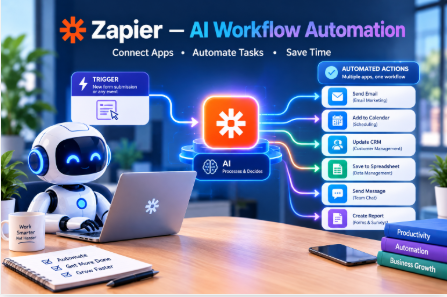
It can automate repetitive activities such as:
- Moving leads between systems
- Sending notifications
- Updating spreadsheets
- Creating records
- Triggering emails
- Connecting business applications
- Running AI-powered workflow steps
Zapier offers a free plan with 100 tasks per month. Its Professional plan currently starts at $19.99 per month, while AI by Zapier uses model-based task pricing.
Real-world example: A real estate company can automatically send a new website lead into its CRM, notify a salesperson, and create a follow-up task.
5. Grammarly — AI Writing Assistance
Grammarly can automate parts of editing and writing work.
Useful functions include:
- Grammar correction
- Rewriting
- Tone suggestions
- Drafting
- Brainstorming
- Translation
- Writing improvement
Grammarly’s current Pro plan is listed at $12 per member per month when billed annually, while monthly billing is $30.
Real-world example: A U.S. customer support team can use Grammarly to improve email clarity before sending responses to customers.
6. Canva — AI Design Automation
Canva helps reduce the time needed for routine visual design work.
AI-assisted design can help businesses create:
- Social media graphics
- Presentations
- Advertisements
- Posters
- Marketing images
- Brand content
Canva currently offers a free plan, while its pricing page lists Pro at $144 per year for one person on the annual option shown on the current page.
Real-world example: A small restaurant in Chicago can create promotional social media graphics without sending every simple design request to a professional designer.
AI Job Replacement Features Comparison
| AI Tool | Main Automation Area | Common Jobs Affected | Human Review |
|---|---|---|---|
| ChatGPT | Writing, research, analysis | Writers, assistants, analysts | High |
| Gemini | Google Workspace tasks | Admin, marketing, office staff | High |
| Microsoft 365 Copilot | Office productivity | Admin, analysts, managers | High |
| Zapier | Workflow automation | Operations, admin | Medium |
| Grammarly | Writing and editing | Writers, support staff | High |
| Canva | Graphic design | Junior designers, marketers | High |
AI performance depends on the task, data quality, workflow design, and level of human supervision. These tools are better described as task-automation systems than universal replacements for entire professions.
Pros and Cons of AI Job Replacement
Pros of AI Automation
- Reduces repetitive work
- Saves employee time
- Can operate at high speed
- Supports small businesses with limited staff
- Helps create content at scale
- Automates predictable workflows
- Can support data analysis
- Helps employees focus on higher-value activities
- Can reduce manual administrative workload
Cons of AI Job Replacement
- Some routine positions may face reduced demand
- AI can produce inaccurate information
- Employees need new technical skills
- Business data can require careful security controls
- Human review remains important
- Automation can create workflow mistakes
- AI adoption can require training and implementation costs
- Not every customer prefers automated communication
A 2026 survey reported by The Verge, based on Pew Research research covering 37 countries, found widespread concern that AI could cause job losses. The United States was among the countries where more than 70% of respondents expected significant employment disruption Best AI Tools for Passive Income.
AI Job Replacement Performance Table
| Task | AI Capability | Human Role | Automation Level |
|---|---|---|---|
| Basic email drafting | Very High | Review | High |
| Meeting summaries | Very High | Verify | High |
| Simple data analysis | High | Check results | High |
| Basic graphic creation | High | Creative direction | Medium-High |
| Customer FAQs | High | Escalations | High |
| Software coding assistance | High | Architecture and review | Medium-High |
| Legal research support | High | Legal judgment | Medium |
| Strategic decisions | Medium | Decision maker | Low |
| Relationship management | Low-Medium | Human interaction | Low |
| Complex leadership | Low | Human leadership | Low |
The table describes practical task automation rather than predictions that a particular occupation will disappear.
Jobs Most Exposed to AI Automation
AI exposure is generally higher when work contains repetitive, digital, predictable activities.
Examples include:
Data Entry
AI can extract information from invoices, forms, documents, and spreadsheets.
Basic Customer Support
AI chatbots can handle common questions about products, orders, schedules, and account information.
Administrative Work
AI can draft emails, organize information, summarize meetings, and automate routine workflows.
Basic Content Production
AI can produce first drafts of product descriptions, social posts, summaries, and simple marketing copy.
Basic Design Tasks
AI image and design tools can create common marketing assets from text instructions.
Routine Coding
AI coding assistants can generate code, explain code, identify errors, and assist with documentation.
AI exposure does not automatically mean a job will disappear. Many occupations combine automatable tasks with activities that require human judgment, accountability, communication, or physical work.
Jobs AI Is Less Likely to Fully Replace
Jobs involving physical environments, human relationships, complex judgment, or direct responsibility can be harder to automate completely.
Examples include:
- Nurses
- Skilled tradespeople
- Electricians
- Plumbers
- Construction workers
- Therapists
- Teachers
- Emergency responders
- Managers
- Sales professionals
- Healthcare professionals
- Business owners
AI can still assist many of these workers.
A teacher can use AI to create lesson ideas. A contractor can use AI to prepare estimates. A salesperson can use AI to research prospects. A nurse can use digital systems for documentation. Human responsibility remains important.
AI Job Replacement Pricing Table
| Tool | Entry Option | Paid Option | Best Use |
|---|---|---|---|
| ChatGPT Business | — | $20/user/month annually | AI assistant |
| Gemini Workspace | Workspace plans | Depends on edition | Office productivity |
| Microsoft 365 Copilot | Trial options | From $18/user/month annually | Microsoft workflows |
| Zapier | $0 | From $19.99/month | Automation |
| Grammarly | $0 | From $12/user/month annually | Writing |
| Canva | $0 | $144/year shown for Pro | Design |
Prices can change and may depend on billing terms, region, plan, taxes, or qualifying subscriptions. OpenAI currently lists ChatGPT Business Standard at $20 per user per month when billed annually and Premium at $100 per user per month annually.
How U.S. Workers Can Prepare for AI Job Changes
Workers can focus on skills that complement AI.
Useful skills include:
- AI prompting
- Data analysis
- Communication
- Critical thinking
- Industry knowledge
- Project management
- AI tool management
- Cybersecurity awareness
- Creativity
- Customer relationships
A worker who understands an industry and knows how to use AI can perform a different role from someone who only performs repetitive manual tasks.
The goal can be to learn how AI changes a job rather than assuming that every AI tool eliminates the entire job.
FAQs About AI Tools That Replace Jobs
1. What jobs can AI tools replace?
AI can automate parts of jobs involving repetitive digital tasks. Examples include basic data entry, routine customer support, simple content creation, administrative work, and some coding tasks.
2. Will AI replace jobs in the USA?
AI is already changing tasks and workflows in U.S. workplaces. The effect differs by occupation and company. Employment outcomes also depend on economic conditions, business demand, technology adoption, and worker skills.
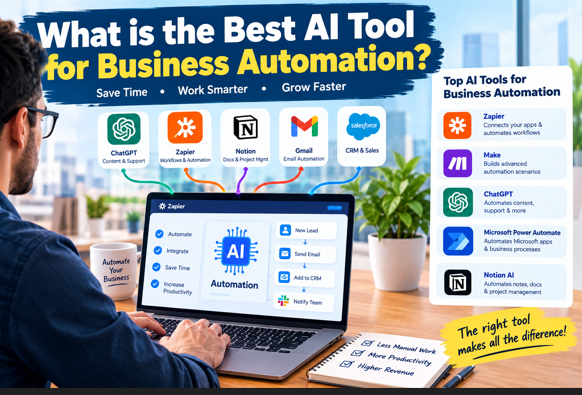
3. What is the best AI tool for business automation?
The right tool depends on the workflow. ChatGPT, Gemini, Microsoft 365 Copilot, and Zapier address different types of business tasks AI Tools for Dubai Real Estate Agents.
4. Can AI completely replace human workers?
AI can perform many individual tasks without direct human input. Complete replacement is more difficult for jobs requiring physical work, complex judgment, accountability, interpersonal relationships, or unpredictable environments.
5. How can workers protect their jobs from AI?
Workers can learn AI tools and develop skills that complement automation. Industry expertise, communication, problem-solving, creativity, and responsible AI use can remain valuable.
Conclusion: The Future of AI and Jobs
AI job replacement is changing how companies organize work in 2026. ChatGPT, Gemini, Microsoft 365 Copilot, Zapier, Grammarly, and Canva can automate many repetitive tasks across American workplaces.
The biggest change may not be the disappearance of every job. It can be a change in what employees spend their time doing.
A marketing employee may spend less time writing routine drafts. An accountant may spend less time organizing data. A customer service worker may handle fewer basic questions. A developer may spend less time writing repetitive code.
Human judgment still matters for complex decisions, customer relationships, strategy, creativity, physical work, and accountability.
For U.S. workers and businesses, learning how to combine human skills with AI tools is becoming an important workplace capability. AI can automate tasks, support employees, and reshape roles. The actual effect depends on how organizations implement the technology and how workers adapt their skills.