Canva vs. Adobe Express is a common search for creators, marketers, students, freelancers, and small businesses looking for an easy design platform in 2026. Both tools help users create social media posts, presentations, videos, flyers, advertisements, documents, and branded content without needing advanced graphic design skills.
A small business owner in the USA may need Instagram graphics in the morning, a promotional flyer in the afternoon, and a presentation for a client meeting. A freelancer may need fast templates and AI-powered editing. A marketing team may need brand controls, content scheduling, and collaboration: Canva vs. Adobe Express Premium canva vs adobe express – best design tool
Canva and Adobe Express solve these problems in different ways.
Canva focuses heavily on simple visual creation, templates, collaboration, and an extensive all-in-one design experience. Adobe Express combines easy design workflows with Adobe’s creative ecosystem, Adobe Stock, Adobe Fonts, and Firefly generative AI.
The right choice depends on your workflow, design experience, content requirements, and budget.
What Is Canva?
Canva is an online visual design platform built around easy-to-use templates and drag-and-drop editing. Users can create social posts, presentations, posters, videos, documents, logos, advertisements, and other visual content.
Canva’s current Free plan includes more than 1,000 design types, over 1.6 million templates, 4.7 million photos, videos, graphics, and audio assets, plus 5GB of cloud storage. Canva Pro adds premium content, AI tools, Brand Kits, scheduling, and additional storage.
Canva has also expanded its AI capabilities. Its Magic Studio includes tools for generating designs, editing images, creating content, writing copy, animation, and other creative tasks. Canva has continued expanding these capabilities with Canva AI and other AI-powered features.
Canva for USA Small Businesses
A local restaurant can use Canva to create:
- Instagram promotions
- Menu graphics
- Facebook advertisements
- Event flyers
- Email graphics
- Seasonal promotions
- Presentation slides
A freelancer can create several client designs from existing templates instead of starting every project from a blank canvas.
What Is Adobe Express?
Adobe Express is Adobe’s simplified content creation platform for designing graphics, videos, documents, social media content, and other marketing materials.
Adobe Express is connected to the broader Adobe ecosystem. Its features include templates, Adobe Fonts, Adobe Stock assets, photo and video editing, social content scheduling, and generative AI powered by Adobe Firefly.
The Adobe Express Free plan currently provides access to 100,000+ static and video templates, 1M+ royalty-free Adobe Stock assets, 4,000+ Adobe Fonts, standard editing tools, 5GB storage, and other features.
Adobe Express Premium expands the feature set with premium templates, 200M+ Adobe Stock assets, 30,000+ fonts, 250 monthly generative credits, one-click resizing, brand kits, and additional editing tools.
Adobe Express also includes Firefly-powered AI features such as image generation, text effects, template generation, object insertion and removal, and other creative functions.
Canva vs Adobe Express: Key Features Comparison
| Feature | Canva | Adobe Express |
|---|---|---|
| Free plan | Yes | Yes |
| Templates | 1.6M+ on Free | 100,000+ on Free |
| AI design tools | Canva AI and Magic Studio | Adobe Firefly AI |
| Social media design | Excellent | Excellent |
| Video creation | Yes | Yes |
| Presentations | Yes | Yes |
| Brand tools | Brand Kit | Brand Kits |
| Photo editing | Yes | Yes |
| Stock assets | Large integrated library | Adobe Stock |
| Fonts | Large library | Adobe Fonts |
| Cloud storage | 5GB Free | 5GB Free |
| Content scheduling | Available | Available |
| Adobe ecosystem | No | Yes |
| Beginner-friendly workflow | Very strong | Strong |
The exact number of templates, assets, AI credits, and other features can change as both platforms update their plans.
Canva vs Adobe Express for AI Design
AI is an important part of modern design software.
Canva AI Features
Canva offers AI features across design, writing, image editing, media generation, and content creation. Magic Design can generate design concepts from prompts or uploaded media. Additionally, Magic Edit can modify parts of images using text instructions. Magic Expand can extend image content beyond its original frame. Magic Write can assist with written content.
Canva’s newer AI direction also includes conversational creative workflows designed to combine design, documents, and image creation in one environment.
Adobe Express AI Features
Adobe Express uses Adobe Firefly for several generative workflows. Users can generate images from text, create text effects, generate templates, and edit visual elements using AI ChatGPT vs Gemini – Which is Better in 2026.
Adobe’s AI tools are useful for marketers who want to create commercial content while staying inside the Adobe ecosystem. Adobe describes its Firefly-powered generative features as designed for commercially safe creation.
Canva vs Adobe Express for Social Media
Social media creators need fast workflows.
Canva provides templates for common platforms and allows users to resize and adapt content for different channels. Its Pro plan includes social content scheduling and additional brand features.
Adobe Express also supports social content creation and scheduling. Premium users can schedule content to multiple social accounts per network and use one-click resizing for different channels.

Real-World Example
Imagine a Texas-based clothing store launching a Labor Day promotion.
The marketing employee needs:
- Instagram post
- Facebook graphic
- Story design
- Promotional banner
- Email image
- Short video
A template-based workflow can reduce repetitive design work. Also, Canva and Adobe Express both provide templates, resizing, brand tools, and content creation features that can support this type of campaign.
Canva vs Adobe Express
Pros
- Simple drag-and-drop editor
- Large template collection
- Strong social media workflow
- Large content library
- AI-powered design features
- Brand Kit functionality
- Useful for beginners
- Strong collaboration features
- Suitable for presentations and documents
Cons
- Some advanced features require paid plans
- Large template libraries can make choosing a design difficult
- AI usage can vary by plan
- Professional photo-editing workflows may require more specialized software
Adobe Express Pros
- Easy-to-use Adobe design platform
- Adobe Firefly generative AI
- Adobe Stock integration
- Adobe Fonts integration
- Strong photo and video tools
- PDF and document workflows
- Brand management
- Connection with other Adobe products
- Useful for marketers already using Adobe
Adobe Express Cons
- Some premium assets require a paid plan
- The Adobe ecosystem can feel larger for beginners
- Advanced Adobe workflows may require separate Creative Cloud applications
- AI features can have credit or usage limits depending on the plan
Canva vs Adobe Express Performance Comparison
Performance can depend on the user’s device, browser, internet connection, project size, and selected features.
| Category | Canva | Adobe Express |
|---|---|---|
| Beginner workflow | Very easy | Easy |
| Template workflow | Excellent | Excellent |
| Social media content | Excellent | Excellent |
| AI design | Strong | Strong |
| Image generation | Strong | Strong |
| Brand management | Strong | Strong |
| Video content | Strong | Strong |
| Adobe integration | Limited | Excellent |
| Quick content creation | Excellent | Excellent |
| Professional ecosystem | Moderate | Excellent |
| Learning curve | Low | Low to moderate |
These ratings describe workflow characteristics rather than independent benchmark scores.
Canva vs Adobe Express Pricing
Pricing changes by region, billing cycle, promotions, and product plan. The figures below reflect current publicly listed US pricing checked in September 2026.
| Plan | Canva | Adobe Express |
|---|---|---|
| Free | $0 | $0 |
| Individual premium | Pro: $144/year on the current annual listing | Premium: $9.99/month |
| Business | $250/year per person | Teams pricing varies |
| Cloud storage | 5GB Free / 100GB Pro | 5GB Free / 100GB Premium |
| AI | Plan-based AI usage | 250 monthly generative credits on Premium |
Canva’s current pricing page lists Canva Free at $0, Canva Pro at $144/year for one person on the displayed annual pricing, and Canva Business at $250/year per person.
Adobe lists Adobe Express Free at $0 and Adobe Express Premium at $9.99/month in the US. Premium includes 250 generative credits per month, premium assets, additional editing tools, 100GB storage, and other features.
Always check the official pricing pages before publishing pricing information because plans and promotions can change.
Official resources:
Canva vs Adobe Express for Small Businesses
Small businesses often need design software that can handle multiple content types without requiring a dedicated graphic designer.
Canva can support a small marketing team creating:
- Social media graphics
- Presentations
- Business flyers
- Product promotions
- YouTube thumbnails
- Event materials
- Brand templates
Adobe Express can support similar workflows while offering Adobe Stock, Adobe Fonts, Firefly AI, PDF tools, and connections with Adobe’s broader creative ecosystem.
A business already using Photoshop, Illustrator, or other Adobe applications may prefer keeping its content workflow inside Adobe’s ecosystem.
A startup focused mainly on quick social media graphics and template-based designs may prefer Canva’s simple visual workflow.
For related AI design research, readers can also explore your internal article on ChatGPT vs Gemini – Which Is Better in 2026.
For AI writing workflows, link naturally to Best AI Writing Tools 2026.
Canva vs Adobe Express: Which Tool Should You Use?
The answer depends on the type of content you create.
Choose Canva if you need:
- A simple design interface
- Large template selection
- Fast social media content
- Easy presentations
- Beginner-friendly editing
- Brand templates
- A broad all-in-one design workflow
Choose Adobe Express if you need:
- Adobe Stock assets
- Adobe Fonts
- Firefly AI
- PDF workflows
- Adobe ecosystem integration
- More Adobe-connected creative workflows
- Professional brand and content management features
A social media manager creating daily Instagram graphics may value Canva’s template-focused workflow.
A marketing professional already working with Photoshop and Illustrator may find Adobe Express useful because it connects with Adobe’s broader creative environment. Canva vs Adobe Express Premium
FAQs About Canva vs Adobe Express
1. Is Canva better than Adobe Express?
Canva and Adobe Express serve similar audiences but have different ecosystems and workflows. Canva emphasizes accessible visual design and templates, while Adobe Express combines simplified design with Adobe Stock, Adobe Fonts, Firefly AI, and Adobe integrations.
2. Is Adobe Express free?
Yes. Adobe Express has a Free plan with no credit card requirement. The current Free plan includes templates, Adobe Stock assets, fonts, standard editing tools, 5GB storage, and limited generative AI capabilities.
3. Is Canva free to use?
Yes. Canva offers a Free plan. Canva Free includes templates, design types, content assets, cloud storage, and limited AI usage. Premium features are available through paid plans Best AI SaaS Trends 2026.
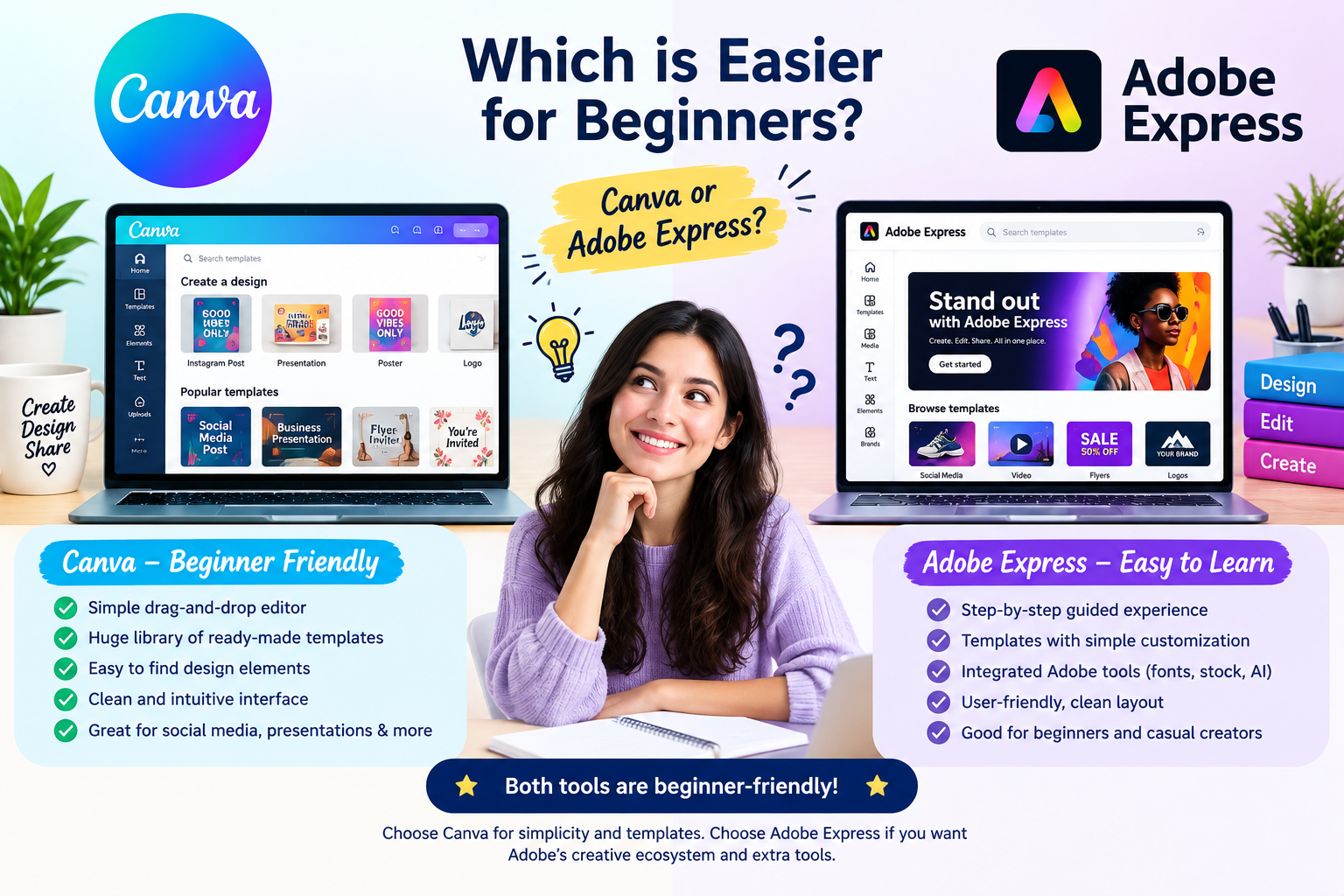
4. Which is easier for beginners, Canva or Adobe Express?
Both platforms are designed to simplify graphic design. Canva has a particularly template-focused drag-and-drop workflow. Adobe Express also provides templates and quick editing tools. Your preferred interface and type of project can determine which feels easier.
5. Which tool is better for AI design in 2026?
Both Canva and Adobe Express offer significant AI capabilities. Canva provides Magic Studio and Canva AI features, while Adobe Express uses Firefly-powered generative tools. Feature availability and AI usage limits depend on the plan.
Conclusion: Canva vs Adobe Express
Canva vs Adobe Express is not simply a choice between two graphic design editors. Both platforms now combine templates, AI, image editing, video creation, branding, and content workflows.
Canva provides a highly accessible visual design experience with a large template ecosystem, extensive content library, and AI-powered creative tools canva vs Adobe Express pricing
Adobe Express provides simplified design tools backed by Adobe’s ecosystem, Adobe Stock, Adobe Fonts, Firefly generative AI, and connections with professional Adobe applications.
For USA creators, freelancers, marketers, students, and small businesses, the practical choice depends on the type of content being created, the existing software ecosystem, required AI features, and budget.
Both platforms offer free plans, so users can test their workflows before paying for premium features.