AI tools for small business are changing how American entrepreneurs handle daily work. A local bakery can use AI to create social media posts. A real estate agent can draft property descriptions in minutes. A home-service company can automate lead follow-ups without hiring another office worker.
Small businesses face familiar problems: limited time, rising costs, repetitive tasks, slow marketing, customer questions, bookkeeping work, and competition from larger companies. AI can help reduce the workload.
The best AI software does not need to replace employees. It can handle repetitive work while owners and teams focus on customers, sales, products, and business decisions.
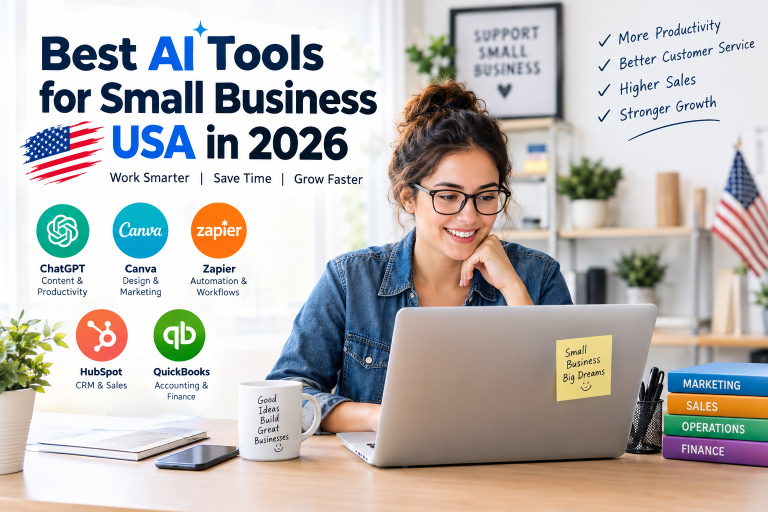
This guide compares five useful AI-powered tools for U.S. small businesses in 2026: ChatGPT, Zapier, Canva, QuickBooks, and HubSpot.
What Are AI Tools for Small Business?
AI tools for small business are software products that use artificial intelligence to help owners and employees complete business tasks faster.
Common uses include:
- Writing emails and website content
- Creating advertisements and social posts
- Automating repetitive workflows
- Managing customer leads
- Organizing financial information
- Creating reports
- Answering customer questions
- Designing presentations and marketing graphics
- Researching markets and competitors
- Summarizing documents and meetings
The right tool depends on the business problem.
A solo consultant may need ChatGPT for research and writing. An online store may benefit from Zapier for automation. A restaurant may prefer Canva for social media graphics. A contractor may need QuickBooks for accounting. A growing sales team may choose HubSpot for CRM and marketing.
Best AI Tools for Small Business USA: Quick Comparison


| AI Tool | Best For | Main Strength | Starting Price |
|---|---|---|---|
| ChatGPT | Writing, research, ideas | General-purpose AI | Free options; Business from $20/user/month annually |
| Zapier | Automation | Connecting business apps | Free plan; Professional from $19.99/month |
| Canva | Design and marketing | AI-powered visual creation | Free; Pro $180/year |
| QuickBooks | Accounting | AI-assisted financial management | Simple Start $38/month standard |
| HubSpot | CRM and marketing | Leads and customer management | Free; Starter from $7/month/seat |
Pricing can change, promotions can apply, and some products charge according to seats, contacts, usage, or AI credits. Check the official pricing page before purchasing.
1. ChatGPT — Best Overall AI Tool for Small Business
ChatGPT is a strong all-purpose choice for entrepreneurs who want one AI assistant for many business tasks.
A business owner can use it to draft emails, create marketing ideas, summarize documents, write product descriptions, prepare meeting notes, brainstorm offers, analyze information, and create business plans.
ChatGPT Business currently starts at $20 per user per month when billed annually, or $25 monthly. Business workspaces require at least two paid seats.
Real-world example: A small landscaping company can ask ChatGPT to create five Facebook posts, three customer follow-up emails, a seasonal promotion, and a basic FAQ for its website.
Key features:
- Business writing
- Research and brainstorming
- Data analysis
- Document assistance
- Image generation
- Custom workflows
- Team workspace
- Business integrations
Pros:
- Extremely versatile
- Easy for beginners
- Useful across many departments
- Strong writing and research support
Cons:
- AI output needs human review
- Advanced business plans cost more
- Poor prompts can produce weak results
2. Zapier — Best AI Automation Tool for Small Business
Best ai tools helps small businesses connect the apps they already use. Its automation system can move information between applications without requiring traditional programming.
Zapier Professional starts at $19.99 per month. Team starts at $69 per month. Paid plans support multi-step workflows, premium apps, webhooks, AI features, and other automation capabilities.
Real-world example: A plumbing company can connect its website form to a CRM, send an automatic email to a new lead, notify the sales team, and add the customer to a follow-up list.
Key features:
- Multi-step workflows
- AI fields
- App integrations
- Webhooks
- Automated lead handling
- Forms and Tables
- Zapier Copilot
Pros:
- Saves repetitive work
- Connects thousands of business apps
- Useful without coding
- Excellent for growing businesses
Cons:
- Costs can increase with usage
- Complex workflows require setup
- Automation errors need monitoring
3. Canva — Best AI Design Tool for Small Business
He is a strong choice for small businesses that need professional-looking visual content without hiring a full-time designer.
Canva AI 2.0 can help users move from an idea to an editable design through conversation. Features include AI-generated designs, brand-aware creation, image generation, writing tools, research, scheduling, and connected workflows.
Canva’s current U.S. pricing page lists a Free plan and Pro at $180 per year for one person.
Real-world example: A coffee shop can create a week of Instagram graphics, a seasonal menu, promotional flyers, and a customer loyalty announcement using Canva.
Key features:
- AI design generation
- Magic Write
- AI image generation
- Background editing
- Brand tools
- Presentations
- Social media designs
- Video creation
Pros:
- Beginner-friendly
- Excellent templates
- Strong AI design features
- Useful for social media
Cons:
- Some advanced features require paid plans
- AI allowances vary by plan
- Professional branding still needs human direction
4. QuickBooks — Best AI Accounting Tool for Small Business
QuickBooks is built for businesses that need accounting, expense tracking, invoicing, reports, and financial organization.
He is Also Online Simple Start is listed at $38 per month before the current promotional discount. He also offers AI-powered and human-guided features through Intuit Intelligence, including expense categorization and financial insights.
Real-world example: A freelance photographer can connect a bank account, organize expenses, send invoices, track income, and prepare financial information for an accountant.
Key features:
- Income tracking
- Expense management
- Invoicing
- Financial reports
- Receipt capture
- Bank connections
- 1099 contractor management
- AI-assisted insights
Pros:
- Designed for business finances
- Useful for U.S. tax preparation
- Strong accountant collaboration
- Good reporting tools
Cons:
- Paid subscription
- Some features cost extra
- Financial records still require review
5. HubSpot — Best AI CRM Tool for Small Business
HubSpot combines CRM, marketing, sales, customer service, and AI features. It can be useful for a small business that has started generating more leads and needs a better way to organize customers.
HubSpot offers free tools. Its Marketing Hub Starter pricing currently starts at $7 per month per seat under the displayed offer, with higher plans designed for larger marketing operations.
Real-world example: A roofing company can store leads in its CRM, track conversations, send marketing emails, manage follow-ups, and monitor customer activity.
Key features:
- CRM
- Lead management
- Email marketing
- Marketing automation
- AI agents
- Customer service tools
- Reporting
- Sales pipelines
Pros:
- Free entry-level option
- Strong CRM features
- Useful for lead generation
- Scales with business growth
Cons:
- Advanced plans become expensive
- Many features can feel complex
- Pricing depends on products and usage
AI Business Tools Performance Comparison
| Tool | Productivity | Automation | Marketing | Finance | Ease of Use | Overall |
|---|---|---|---|---|---|---|
| ChatGPT | 10/10 | 8/10 | 9/10 | 7/10 | 9/10 | 9.0/10 |
| Zapier | 9/10 | 10/10 | 8/10 | 6/10 | 8/10 | 8.2/10 |
| Canva | 8/10 | 7/10 | 10/10 | 4/10 | 10/10 | 7.8/10 |
| QuickBooks | 8/10 | 7/10 | 3/10 | 10/10 | 8/10 | 7.2/10 |
| HubSpot | 9/10 | 9/10 | 10/10 | 4/10 | 7/10 | 7.8/10 |
Scores are editorial ratings based on usefulness for common small-business tasks, ease of use, breadth of features, and value. They are not vendor-reported scores.
Pros and Cons of Using AI for a Small Business

Pros
- Saves employee time
- Reduces repetitive work
- Helps create content faster
- Supports customer service
- Improves marketing productivity
- Makes business data easier to understand
- Helps solo entrepreneurs compete with larger companies
- Can reduce the need for multiple specialized tools
Cons
- AI can make factual mistakes
- Subscription costs can grow
- Employees need basic AI skills
- Sensitive information requires careful handling
- Automation can create errors if poorly configured
- Human review remains important
Small businesses should avoid putting confidential customer, financial, or private company information into an AI system unless the service and business plan provide appropriate protections.
AI Tools for Small Business Pricing Table
| Tool | Free Option | Paid Starting Point | Best Value For |
|---|---|---|---|
| ChatGPT | Yes | $20/user/month annually for Business | General business work |
| Zapier | Yes | $19.99/month | Automation |
| Canva | Yes | $180/year Pro | Design |
| QuickBooks | No permanent full accounting plan | $38/month Simple Start | Accounting |
| HubSpot | Yes | $7/month/seat Starter offer | CRM and marketing |
Prices shown are U.S. prices found on official vendor pages and may change. Promotions may have eligibility requirements.
How to Choose the Best AI Tool for Your U.S. Business
Look at the task before looking at the software.
A solo business owner may get the most value from ChatGPT and Canva.
A service business can combine ChatGPT, Zapier, and QuickBooks.
An online store may benefit from ChatGPT for product content, Canva for creative work, and Zapier for workflow automation.
A growing sales company may need HubSpot as its customer-management system.
A freelancer may prefer a small stack instead of paying for many subscriptions.
Use one tool for one clear business problem. Measure the time saved. Keep the tool if it produces measurable value.
FAQs:
What is the best AI tool for a small business?
ChatGPT is the best overall choice for many small businesses because it can support writing, research, brainstorming, analysis, customer communication, and other daily tasks.
Are AI tools worth it for small businesses?
Yes, when the tool solves a real business problem. Automation, marketing production, customer management, and administrative work can provide measurable time savings.
What is the best free AI tool for small business?
ChatGPT, Canva, and HubSpot all offer free options. The best choice depends on whether the main need is productivity, design, or customer management.
Can AI replace small-business employees?
AI is better viewed as a productivity assistant than a complete employee replacement. Human judgment, customer relationships, creativity, accountability, and business decisions still matter.
How should a small business start using AI?
Choose one repetitive task. Test one tool for that task. Create a simple workflow. Review the results. Track time saved and business impact before adding more AI software.
Conclusion:
ChatGPT wins overall because it offers the widest range of practical uses for a typical U.S. small business. It can help with writing, research, planning, customer communication, content creation, analysis, and everyday productivity.
Zapier wins automation.
Canva wins design and visual marketing.
QuickBooks wins accounting.
HubSpot wins CRM and marketing management.
There is no single AI platform that is perfect for every company. The strongest approach is a small AI stack built around actual business needs.
A local service company could start with ChatGPT and QuickBooks. A marketing-focused company could add Canva. A business with repetitive app-based tasks could add Zapier. A company with a growing sales pipeline could add HubSpot.